 Knitting Chart
Knitting Row Counter
Tap the big number or press Space each time you finish a row. The count saves in this browser automatically, with no sign-up, and it can remind you on the rows where you increase, decrease or cross a cable.
How to use the row counter
Count a row when you finish it
Tap the big number, or press Space, each time you finish a row. − or the down arrow takes one back, and Z undoes a mistake.
Set a target and a repeat
Set a target to see how far you have to go. If the pattern repeats, enter its row count — 8 for a cable crossed every 8 rows — and the counter names your place in it.
Add a reminder
Ask for a reminder every N rows from row S, or on rows such as 6, 12, 18. It appears when the counter reaches that row, and phones that support vibration can buzz.
Count stitches too
Add an extra counter for stitches or anything else. With reset each row on, it returns to 0 whenever the row count goes up.
Watch a quick walkthrough · 1:03
Set a target and pattern repeat, add a shaping reminder, and count stitches that reset every row.
Keep track of pattern repeats and shaping
A knitting row counter earns its place when the pattern has shaping or a repeat that moves. Take a cable panel crossed every 8 rows: after 10 finished rows, with the repeat set to 8, the counter shows
Now on row 11 · row 3 of 8 in repeat 2
The first 8 rows were repeat 1; rows 9 and 10 opened repeat 2, and row 11 is its third row. Without the counter you would work that out every time you picked the knitting up.
Reminders use the same row numbers. A sleeve increased every 6 rows from row 6 gets reminders on rows 6, 12 and 18: with 5 rows finished you are about to knit row 6, and after 11 finished rows the next is row 12. A cable crossed every 8 rows from row 8 reminds you on 8, 16 and 24, and a 60-row target shows how much of the sleeve is done.
Each project keeps its own count, repeat, reminders, counters and note, so a second project never overwrites the first.
How to count rows in your knitting
Stockinette draws a grid: each V is one row, so count straight up a single column of Vs from the cast-on edge to the needle. The loops on the needle are the row in progress, not a finished row. In garter stitch every ridge is two rows, so a scarf with 30 ridges has 60 rows.
Seed stitch is harder to read because every stitch changes between knit and purl from one row to the next. Pick one column and count the purl bumps going up it: there is one bump every second row, so double the number. In ribbing, count the Vs up a knit column, as in stockinette.
To count knitted stitches rather than rows, count the loops on the needle, not the fabric below. Count in groups of 10 and slip a marker after each group, so a recount only covers the last group.
The cast-on row is usually not counted: row 1 is the first row you knit. Some patterns say otherwise, and then their count wins.
Long projects are where counts drift. Put a removable stitch marker in the edge every 10 rows, so a wrong total only means counting back to the last marker. Recount when you pick the work up after a break.
Row counter app, clicker or online counter?
All four keep your place. They differ in what happens when you look away, and in what you carry.
| Counter | How it works | Reminders |
|---|---|---|
| Physical clicker | A small counter that slides onto the needle or hangs on a cord, and you click it after each row. Cheap, but a second project needs another counter or a note. | None |
| Chain counter | Numbered links on a chain that hangs from the needle: you move it one link after each row, so the link on the needle marks your place. | None |
| Phone app | Installed from an app store, and features differ from app to app. | Depends on the app |
| This page | Runs in a browser on a computer or phone, with nothing to install and no sign-up. It holds repeats, reminders, counters and notes, saves in this browser, and Save file moves a copy to another device. | Yes |
If you only knit plain rows and never lose count, a clicker is enough. Once a pattern asks for an increase on row 6 and a cable on row 8, a counter that holds both saves the arithmetic.
Repeat & shaping reminder example
An 8-row cable repeat tracked alongside its 16-row chart grid, showing how finished rows map to the current repeat row and cable-cross alerts.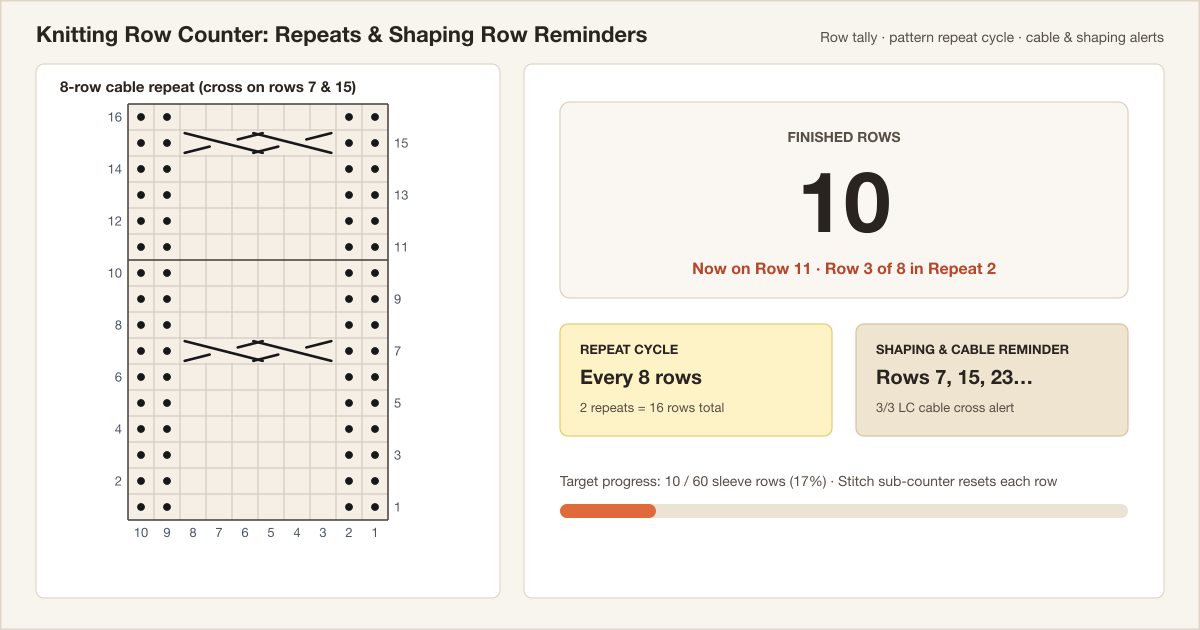
Questions about the row counter
Is this row counter free?
Yes. It is free, with no sign-up, and saves your projects in this browser.
Does the count stay if I close the page?
Yes. Your projects are saved in this browser, so the count is there when you come back. Clearing your browsing data removes them, so use Save file now and then. To move to another device, use Save file on the old one and Open file on the new one.
How do I use a row counter for knitting?
Finish a row, then tap the big number once or press Space. − takes one off if you tap twice, Z undoes the last change, and you can type a number in directly or set it back to 0.
How does a chain row counter work?
It is a short chain of numbered links that hangs from the needle. Each time you finish a row, you move it along one link, so the link on the needle shows your count. It has no reminders.
Can I count stitches and rows at the same time?
Yes. Keep the main count for finished rows and add an extra counter for stitches. Set it to reset each row, and it goes back to 0 as soon as the row count goes up.
Is this a digital row counter or a stitch counter?
Both. It is a digital row counter that keeps a tally of finished rows, and you can add a second counter for stitches, repeats or anything else. It runs in the browser on a phone or computer, so there is no gadget to buy.
How do I count rows in seed stitch?
Follow one column of stitches upward and count the purl bumps. In seed stitch each column has a bump every second row, so double the count to get the rows.
Can I use it for crochet?
Yes. A crochet row is a finished row in the same way, so tap once at the end of each row. Repeats and reminders work the same way.
Keep going
- Knitting Chart Maker
Draw your colorwork or stitch chart, then count the rows here as you knit it.
- Knitting Needle Size Chart
Convert the needle size on your label between mm, US, UK and Japanese sizes.
- Knitting Pattern Tracker
Following a chart or a PDF pattern? Highlight the row you are on and count it in one tap.