 Knitting Chart
Knitting Pattern Tracker
A knitting pattern app in your browser: follow a PDF pattern or your own chart row by row, with a highlighter on the row you are knitting, a big Row done button, and your place saved as you go on your own chart, and with Pro on every PDF and chart, in your account on all your devices. Nothing to install, and the screen stays on while you knit.
How to use the pattern tracker
Open your pattern
Import a PDF pattern you bought or downloaded, or pick a chart you drew in the chart maker. Without Pro the PDF is shown on screen and your place is not kept when you close it; with Pro it is stored in this browser and privately in your account, so you come back to the same row on any device.
Put the highlighter on your row
Drag the yellow band onto the row you are on and pull its edges to fit one row. On your own charts the current row is framed for you, with the row written out in words.
Tap Row done after each row
The count goes up and the highlighter moves to the next row. Close the page and come back later: it opens on the same row.
Watch a quick walkthrough · 1:05
Frame the active row on your chart or drag the yellow highlighter across a PDF pattern and tap Row done.
Your own charts or a PDF pattern
On a chart you drew here, the tracker knows every stitch. It frames the current row, dims the rest, says whether it is a right-side or wrong-side row and which way to read it, and writes the row out: “Row 12 (RS): k3 A, k2 B, k5 A.” Each run of one color is a button you can tick off as you go, so a long colorwork row never loses its place halfway.
On a PDF pattern, the tracker cannot read the chart, so you set the highlighter once: drag it onto your row and pull its top and bottom edges to fit one row. After that, Row done moves it by exactly its own height. If a lace chart shows right-side rows only, set each line to count as two rows. Written patterns work the same way, one line at a time, top down.
A chart split over two pages, or charts spread across a long PDF: tap the crop button, drag a box around each part, and the tracker shows them joined as one chart, each chart with its own highlighter that moves on Row done. Pages you do not need (cover, other sizes) can be hidden. Only the boxes are saved; your PDF is never changed or copied.
A pattern written for several sizes, like “cast on 88 (96, 104, 112) sts”: pick your size once and the tracker circles your number in every group like that, the way you would with a pen on a printout. The numbers are found by simple rules in the PDF’s own text, on your device and without AI, so check them as you go: tap a circle to pick another number or to say it is not a size. A scanned PDF has no text to read; circle your sizes with the marker instead. Anyone can try it on screen; Pro keeps your size with the project.
The place is saved as a position on the page, not on the screen, so it stays on the same row when you zoom, turn the phone or open the project on another device.
Use it on your phone, tablet and computer
A knitting pattern tracker app without the app store: the tracker is a web app, so the same knitting pattern app runs on an iPhone, an iPad, an Android phone or tablet and a computer, with nothing to install. Add it to your Home Screen and it opens full screen like an installed app, works offline once loaded, and needs no account to start. If you were looking for a knitting chart app for iPhone or iPad, this is it, in Safari.
Start at the computer, carry on on the sofa. With Pro, open the ⋮ panel and scan the QR code under “Continue on your phone”: the chart or PDF pattern opens in the tracker on your phone at the row you are on, and the rows you knit there show on every device.
Import a PDF pattern you bought or downloaded (up to 10 MB each):
- Free: the PDF opens on screen with the row highlighter, Row done, zoom, and marking, cropping and size circling to try. Your place is not kept when you close it, and the file never leaves your device.
- With Pro: every PDF stays at the row you stopped, with its counters, notes and marks, in this browser and privately in your account, so you pick it up on another device. Your account holds up to 200 MB of PDFs in all.
Follow a chart you drew in the chart maker: one chart at a time free, with the row count, counters, reminders and notes kept in this browser; Pro follows as many as you like and keeps them in your account. Compare everything in and out of Pro on the pricing page.
Knitting Chart Specifications & Free Limits
Verified Nov 2026Core capabilities, no-sign-up free allowances and optional Knitting Chart Pro plans at knittingchart.com (independent browser web app).
| Specification | Free (no sign-up) | Pro optional upgrade |
|---|---|---|
| Supported knitting techniques | Stranded colorwork / Fair Isle, intarsia (bobbin & end counts), cables (300 symbols, 2–12 sts wide), lace, mosaic slip-stitch, double knitting, brioche, twisted stitches, lettering (3 × 5 & 5 × 7 fonts) and crochet color grids | Same techniques, plus left-handed mirrored charts, merged pattern repeats and custom mosaic / per-repeat numbering kept in downloads |
| Stitch symbol library | 501 built-in symbols (including 300 cables) + custom user-drawn symbols with RS/WS abbreviations and stitch-count checks in the chart | Saved personal stitch library & reusable motif tiles across all charts and devices; US, dash or Japanese (JIS) symbols in downloads |
| Maximum grid size & colors | Up to 500 × 500 stitches and rows, up to 64 colors per chart, drawn in true stitch proportions from your gauge | Up to 1000 × 1000 stitches and rows, up to 64 colors per chart |
| Yarn brand shade cards & yardage | 268 yarn lines across 80 brands (14,042 named shades) printed in the color key and written rows | Adds metres/yards and balls per color calculated from your gauge, including stranded floats |
| Photo-to-chart & pattern import | On-device photo converter (2–16 colors, crop, color-pick, stray-stitch cleanup, never uploaded); trace 3 pictures/day; preview written-to-chart & PDF colorwork reader on screen | Unlimited picture tracing; open pasted written instructions or PDF colorwork charts as editable charts |
| No-login free exports & editing trials | Unlimited watermark-free PNGs; 1 watermark-free PDF/day with color & symbol key and row-by-row written instructions (English, German, Norwegian, Swedish); 3 notes/chart; cut/move/mirror/repeat/outlines 3/day each | Unlimited PDFs with merged repeats, unlimited editing tools, notes and outlines, SVG designer pack, Excel (.xlsx), Word (.docx), CSV and multi-chart publishable pattern PDFs |
| Row-by-row pattern & PDF tracker | 1 chart project saved in browser + open any PDF pattern up to 10 MB on screen with row highlighter, offline support & wake lock (no app install) | Unlimited charts & PDFs (10 MB each, 200 MB total) kept at your exact row across phone, tablet & computer via QR code, with saved marks, cropped charts & circled sizes |
| Pricing, platforms & verification | $0 forever in any modern browser (Windows, Mac, Linux, iPhone, iPad, Android) — no account required (Verified Nov 2026) | $3.99/month or $24/year (auto-renews, cancel anytime in one click), or $59 one-time lifetime license · 14-day money-back (Verified Nov 2026) |
Row highlighter & color-run tracker preview
How a chart looks while following it row by row: completed rows dimmed below, current row framed in yellow, and color runs split into checkable blocks.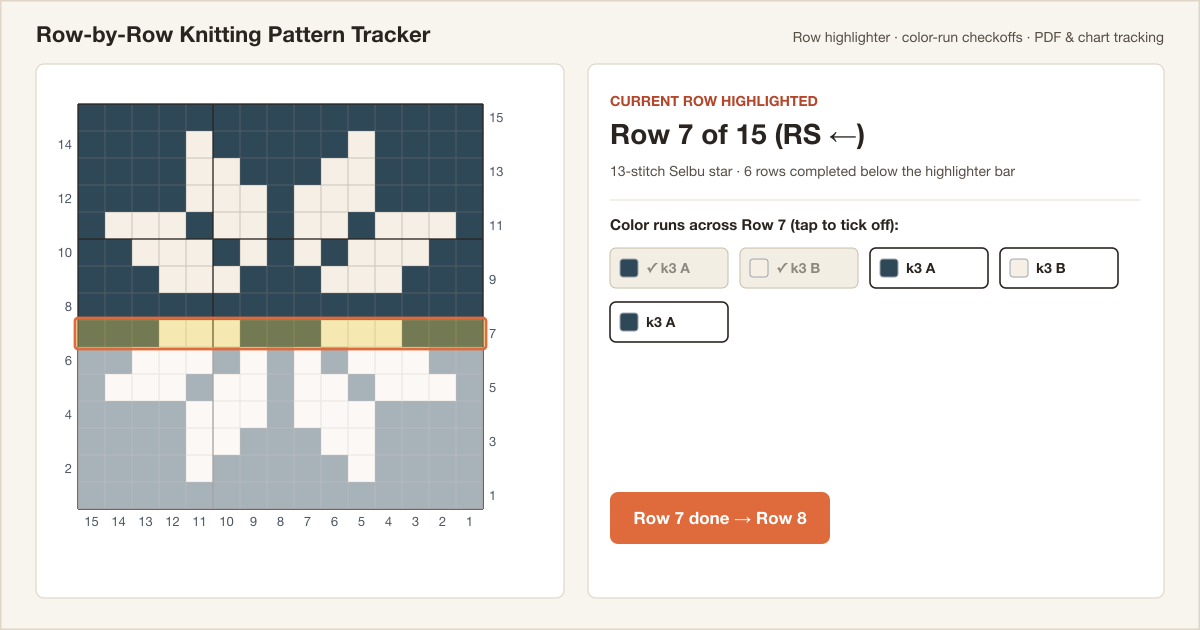
Questions about the pattern tracker
Is there a knitting pattern app for iPhone and Android?
This page is one: it runs in Safari, Chrome or any modern browser on iPhone, iPad, Android and computers, with nothing to install. Add it to your Home Screen to open it like an app. Import a PDF pattern to follow it free on screen, or follow a chart you drew here; Pro keeps your place in every pattern on all your devices.
Is the pattern tracker free?
Yes, for one of your charts at a time: following a chart you drew here, with the row count, counters, reminders and notes, is free; delete its project when you are done to start the next. A PDF pattern opens free on screen with the highlighter, but your place is not kept when you close it. Knitting Chart Pro follows as many charts and PDFs as you like, keeps them in your account and syncs your place between your phone, tablet and computer; a QR code in the ⋮ panel opens the pattern on your phone. Marking a pattern (highlighter, boxes, sticky notes, symbol colors), cropping and joining the charts in a PDF and circling your size in a multi-size PDF can be tried by anyone on screen; Pro keeps them with the project. Projects already in your browser stay and keep counting.
How large can a PDF be?
Up to 10 MB per file, with or without Pro. With Pro, your account holds up to 200 MB of PDF patterns in all. A larger file can usually be made smaller: open it and print it to a new PDF (Print, then Save as PDF), or run it through a PDF compressor, then import the smaller file.
Does it work offline?
Yes, once you have opened the page here with a connection. Your chart projects (and with Pro your PDF patterns) and your place are saved in this browser, so the tracker keeps working with no signal. With Pro, changes made offline sync when you are back online.
Who can see my PDF patterns?
Without Pro, nobody: the PDF is opened and drawn in your browser and never leaves your device. With Pro, the file is stored privately in your account so your other devices can open it. It is never shared, read, analyzed or used to train AI.
Can I use patterns I bought on Etsy or Ravelry?
Yes. Import the PDF you downloaded after buying it, to knit it yourself. Only add files you have the right to use; the tracker has no sharing, so a pattern stays yours.
Can it open a PDF with a password?
Yes. Type the password when the tracker asks for it. It is used only to open the file in your browser and is not saved or sent anywhere.
How do I add it to my iPhone Home Screen?
Open this page in Safari, tap the Share button, then Add to Home Screen. It opens like an app, and Safari does not clear its data after 7 days without a visit as it does for websites in a tab.
Can I use a page turner or foot pedal?
Yes. Space, Enter, the down or right arrow and Page Down count a row; Backspace, the up or left arrow and Page Up go back one. Bluetooth page turners and pedals send these keys.
Keep going
- Knitting Chart Maker
Draw your colorwork or stitch chart, then follow it here row by row.
- Knitting Row Counter
Just counting rows, with no pattern to follow? The row counter keeps repeats and reminders.