 Knitting Chart
Best Knitting Chart Software: 6 Chart Makers Compared
The best knitting chart software depends on what you chart. For colorwork in the browser, Knitting Chart and Stitch Fiddle are the quickest free starts, and Knitting Chart also draws 300 cables free; Chart Minder adds free row tracking while you knit; Stitchmastery is a paid desktop program for stitch-pattern charts with written instructions; knitCompanion is a phone and tablet app for following the PDF patterns you already have rather than drawing charts; and Knit Visualizer offers more than 75 cable stitches but has not been updated since 2008.
Five of the six are knitting chart generators in the broad sense: knitting design software for designing knitting patterns on a grid, one square per stitch, whether you call it a chart creator, a charting app, knitting pattern design software or a knitting grid maker. knitCompanion is the knitting pattern app of the group: it holds the pattern while you knit.
We make Knitting Chart, so weigh that. Every fact about the other five comes from their own pages, opened on 18 November 2026 (sources at the end); where another tool does something better than ours, this page says so.
The six side by side
| Software | Runs on | Free version | Paid version | Best for |
|---|---|---|---|---|
| Knitting Chart (this site) | Browser, no account | Charts up to 500 × 500 (1000 × 1000 with Pro), 501 stitch symbols including 300 cables, symbols you draw yourself, rows whose stitch count does not add up marked red, photo to chart, yarn brand shades, selecting and copying (cut, paste, move, fill with repeats, find and replace, the mirror brush that swaps leaning stitches, the repeat preview and tracing a picture 3 times a day each), 3 words or sticky notes per chart, a knitted-look preview on screen, sharing a chart by link (free sign-in), PNG any time and a PDF a day with key and row-by-row written instructions in English, German, Norwegian or Swedish, no watermark; follow one chart, or a PDF pattern on screen, row by row | Pro: $3.99 a month or $24 a year, renews until you cancel · or $59 once for lifetime | Colorwork, lace and cable charts printed or shared today |
| Stitch Fiddle | Browser, account | 15 charts, up to 300 × 300, picture upload, copy and paste | Premium: $4.99 for a month or $29.99 a year; nothing renews | Knitting plus crochet and cross stitch in one place |
| Chart Minder | Browser | Chart design, image to chart, stitch-shaped preview, row tracking, image download with watermark | Pro: $11 a quarter or $30 a year (subscription you can cancel) | Following your place in a chart while you knit |
| Stitchmastery | Desktop download: Windows, Mac (Apple silicon or Intel), Linux | Demo mode until activated | $90 (£70) once, for two computers; later upgrades may cost extra | Stitch-pattern charts with generated written instructions |
| knitCompanion | App: iPhone, iPad, Mac, Android, Kindle Fire | Basics: track your row and place along it, counters for every project, Ravelry and Dropbox links | Setup+Essentials: about $30 a year (App Store base price), 7-day free trial | Following PDF patterns you bought, with markers and counters |
| Knit Visualizer | Windows; Mac only up to OS X 10.14 | Demo download | $185 once | Cable charts on an older Windows PC |
Prices in US dollars as each site showed them on 18 November 2026.
What you get without paying
Most knitters choose on one question: can I print a clean chart with a key without paying? The answer differs a lot between the six.
- Knitting Chart — yes. The PNG (any time) and the PDF (one a day) include the color and symbol key and row-by-row written instructions, with no watermark and no account. Cut and paste, move, rotate, flip, find and replace and a repeat preview work free 3 times a day. Pro takes the daily counts away and adds account sync across devices with a QR code to keep knitting on your phone, written instructions with repeats merged, the yarn each color takes, unlimited outlines, unlimited words and sticky notes on the chart (3 per chart free), a knitted-look picture (free on screen), a left-hand view, custom numbering, one-click stitch count fixes, opening a written pattern as a chart, opening a colorwork chart from a PDF as a chart, an SVG designer pack, Word, Excel and CSV downloads and a pattern document that puts several charts in one PDF with your own cover, logo and copyright. The pattern tracker follows one of your charts at a time free and opens a PDF pattern free on screen; Pro keeps every chart and PDF at the row you stopped, on every device.
- Stitch Fiddle — partly. The free version keeps 15 charts and includes picture upload and copy and paste. Downloading a vector or PDF file, the legend as a separate file, written instructions, mirror and rotate, and files without the “Stitch Fiddle” mention are Premium.
- Chart Minder — partly. Free charts download as an image with a Chart Minder watermark and 95 colors; Pro removes the watermark and adds copy and paste, flip and rotate, find and replace and a repeat preview.
- knitCompanion — it does not draw charts. Its free Basics track your row and your place along it, with counters, on patterns in the app; setting up a pattern, Magic Markers, scribbling, highlighting and chart recognition come with Setup+Essentials.
- Stitchmastery and Knit Visualizer — no. Both run as a demo until you buy a license.
Each one in a paragraph
Knitting Chart
A chart maker that runs in the browser and shows the chart in true stitch proportions, since a knitted stitch is wider than it is tall. Charts stay on your device unless you choose Pro; the photo to knitting chart converter also works on the device and matches colors to your yarn. The editor has 501 stitch symbols, 300 of them cables from 2 to 12 stitches wide, and the written rows name each one the way patterns do. A stitch it lacks you can draw yourself, with its abbreviations and stitch counts, free in that chart; Pro keeps your own stitches in a library and your motifs and borders as tiles for every chart, and switches the symbols to the dash or Japanese style.
Mirroring a motif swaps k2tog and ssk and the cable crosses, so the mirrored half still knits correctly. Rows whose stitch count does not add up after decreases and increases are marked red (Pro fixes them in one click). Written instructions go both ways: the chart is written out row by row, and pasted written rows are drawn as a chart (free to see, Pro to open and edit). You can write words and sticky notes on the chart, see it as knitted fabric, share it by link, and follow it row by row in the pattern tracker, which also opens a PDF pattern you bought.
Stitch Fiddle
The best-known online chart maker, and the only one of the five that also does crochet and cross stitch. Free charts are capped at 300 × 300 stitches and 50 colors or symbols each. Premium is a fixed period that does not renew, and it comes with a one-click refund guarantee.
Chart Minder
A browser tool run by one designer. Its free version already includes a stitch-shaped preview, a gauge calculator, generating a chart from an image and highlighting your current row while you knit. Pro is a subscription; you can cancel straight after paying and keep Pro until the period ends.
Stitchmastery
A desktop program for flat, circular and two-pass charts with a large stitch library and automatically generated written instructions; it also checks that rows and columns add up, and lets you create your own stitches. It downloads for Windows, Mac (Apple silicon and Intel) and Linux. One activation key costs $90 (£70), works on two computers and does not expire; future upgrades may cost extra.
knitCompanion
An app for iPhone, iPad, Mac, Android and Kindle Fire that holds the PDF patterns you already own. You set up a pattern once, then sliding row and stitch markers, counters linked to repeats and reminders keep your place; it works without internet. The Basics are free for all your patterns; Setup+Essentials is a yearly subscription with a 7-day free trial, priced from a base of US $30 a year in the App Store. It is not a chart maker: to draw your own chart you use one of the other tools here and then follow it in knitCompanion or a tracker.
Knit Visualizer
Desktop software with more than 75 cable stitches and over 40 common stitches. The current version, 2.1, dates from December 2008; its own page says it supports Windows XP to Windows 10 and does not work on macOS Catalina or newer. It costs $185.
Knitting pattern design software: what to look for
If you design and publish patterns, the chart is only part of the job. These are the checks worth making in any knitting chart software before you commit, and where this site stands on each:
- Enough stitches. Knitting Chart has 501 stitch symbols, 300 of them cables from 2 to 12 stitches wide, plus lace stitches such as nupps and no-stitch squares. Stitchmastery also has a large library and stitches of your own.
- Your own stitches. Draw a symbol, give it abbreviations for right-side and wrong-side rows, the stitches it uses and makes, and its mirror pair. Free in the chart; Pro keeps a library for every chart.
- Counts that add up. A row that has more or fewer stitches than it should is marked red, so a test knitter does not find it first. Stitchmastery checks rows and columns too.
- Written instructions from the chart. Free row by row; Pro merges repeats the way patterns write them (*k2, p2; rep from * to end). Going the other way, pasted written rows are drawn as a chart, free to see; Pro opens it to edit.
- Clean files to publish. No watermark on PNG or PDF; Pro adds SVG chart and key, US, dash or Japanese symbols, and a pattern document with your cover, logo and copyright line.
- Knitters who follow it. A shared chart link, a left-hand version for left-handed knitters (Pro), and a pattern tracker they can follow it in, row by row.
Which one to pick
- A colorwork hat, mittens or a name on a sweater: any browser tool works. Knitting Chart is the one that prints the chart, key and written rows free; Stitch Fiddle if you also chart crochet.
- A chart from a photo or a pet portrait: Knitting Chart and Chart Minder both convert images free; Stitch Fiddle's free version uploads pictures but custom colors for them are Premium.
- Cables or lace: Knitting Chart draws 300 cables up to 12 stitches wide and writes the rows free in the browser, and symbols of your own can be drawn in it free. Stitchmastery is the desktop choice: a one-off license is cheaper than two years of most subscriptions.
- Keeping your place while you knit: Chart Minder highlights the current row; on this site the knitting row counter counts rows and repeats for any printed chart.
- Following a PDF pattern you bought: knitCompanion is the dedicated app, with the most tools once you subscribe. If you would rather not install anything, the pattern tracker here opens the PDF in the browser on a phone, tablet or computer with a row highlighter, free on screen; Pro keeps your place in the PDF on every device.
- No computer at all: print knitting graph paper sized to your gauge and draw by hand; the knitting chart symbols key lists what each symbol means.
Knitting Chart Specifications & Free Limits
Verified Nov 2026Core capabilities, no-sign-up free allowances and optional Knitting Chart Pro plans at knittingchart.com (independent browser web app).
| Specification | Free (no sign-up) | Pro optional upgrade |
|---|---|---|
| Supported knitting techniques | Stranded colorwork / Fair Isle, intarsia (bobbin & end counts), cables (300 symbols, 2–12 sts wide), lace, mosaic slip-stitch, double knitting, brioche, twisted stitches, lettering (3 × 5 & 5 × 7 fonts) and crochet color grids | Same techniques, plus left-handed mirrored charts, merged pattern repeats and custom mosaic / per-repeat numbering kept in downloads |
| Stitch symbol library | 501 built-in symbols (including 300 cables) + custom user-drawn symbols with RS/WS abbreviations and stitch-count checks in the chart | Saved personal stitch library & reusable motif tiles across all charts and devices; US, dash or Japanese (JIS) symbols in downloads |
| Maximum grid size & colors | Up to 500 × 500 stitches and rows, up to 64 colors per chart, drawn in true stitch proportions from your gauge | Up to 1000 × 1000 stitches and rows, up to 64 colors per chart |
| Yarn brand shade cards & yardage | 268 yarn lines across 80 brands (14,042 named shades) printed in the color key and written rows | Adds metres/yards and balls per color calculated from your gauge, including stranded floats |
| Photo-to-chart & pattern import | On-device photo converter (2–16 colors, crop, color-pick, stray-stitch cleanup, never uploaded); trace 3 pictures/day; preview written-to-chart & PDF colorwork reader on screen | Unlimited picture tracing; open pasted written instructions or PDF colorwork charts as editable charts |
| No-login free exports & editing trials | Unlimited watermark-free PNGs; 1 watermark-free PDF/day with color & symbol key and row-by-row written instructions (English, German, Norwegian, Swedish); 3 notes/chart; cut/move/mirror/repeat/outlines 3/day each | Unlimited PDFs with merged repeats, unlimited editing tools, notes and outlines, SVG designer pack, Excel (.xlsx), Word (.docx), CSV and multi-chart publishable pattern PDFs |
| Row-by-row pattern & PDF tracker | 1 chart project saved in browser + open any PDF pattern up to 10 MB on screen with row highlighter, offline support & wake lock (no app install) | Unlimited charts & PDFs (10 MB each, 200 MB total) kept at your exact row across phone, tablet & computer via QR code, with saved marks, cropped charts & circled sizes |
| Pricing, platforms & verification | $0 forever in any modern browser (Windows, Mac, Linux, iPhone, iPad, Android) — no account required (Verified Nov 2026) | $3.99/month or $24/year (auto-renews, cancel anytime in one click), or $59 one-time lifetime license · 14-day money-back (Verified Nov 2026) |
Six knitting chart tools summary sheet
At-a-glance comparison of platform support, free grid sizes, stitch symbol libraries, watermark rules and pricing across all six tools.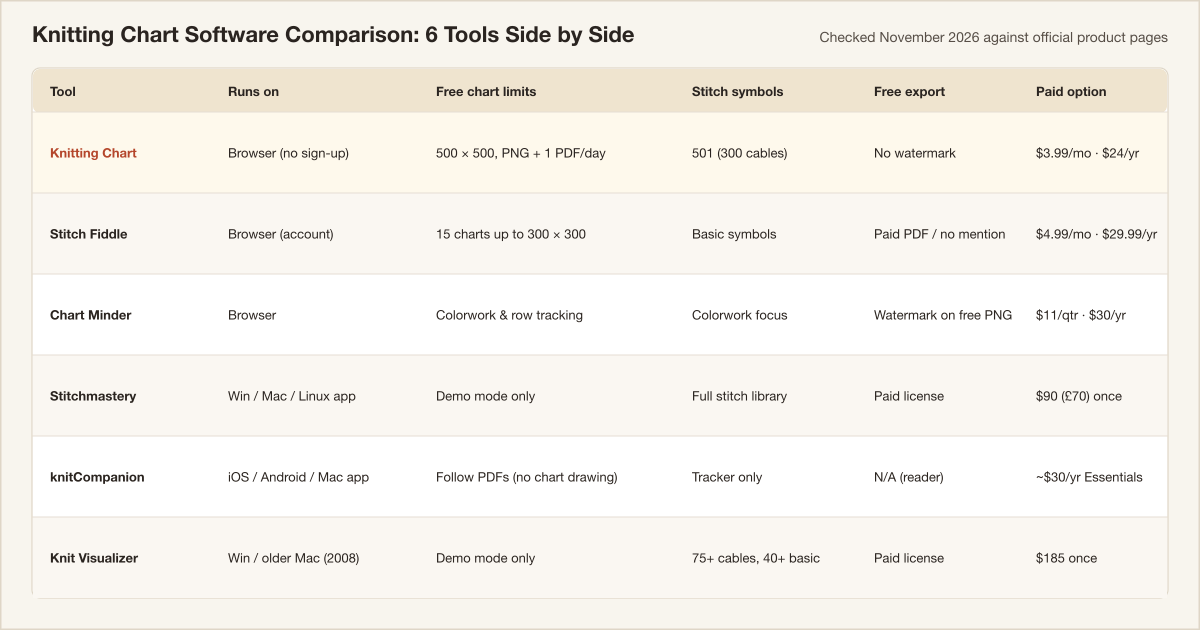
Questions about knitting chart software
Is there a free knitting chart maker without a watermark?
Yes. Knitting Chart's PNG downloads and a PDF a day are free, have no watermark and include the color key and written instructions. In Stitch Fiddle and Chart Minder, files without their name or watermark are part of the paid version (checked 18 November 2026).
What is the best free knitting chart software?
For colorwork, a browser tool: Knitting Chart prints the most for free (chart, key and written rows), Stitch Fiddle adds crochet and cross stitch, and Chart Minder adds row tracking. For cables, Knitting Chart has 300 cable symbols free, and you can draw symbols of your own in it free; Stitchmastery does the same as a paid desktop program.
Can I make a knitting chart in Excel or Google Sheets?
Yes: narrow the columns, color the cells and print. Spreadsheet cells are square, though, and knitted stitches are wider than tall, so motifs come out squashed. A chart maker or knitting graph paper drawn to your gauge keeps the shape.
What software do knitwear designers use for charts?
Designers who publish patterns with cables and lace often use desktop programs such as Stitchmastery, which generates written instructions from the chart. For colorwork, browser chart makers export a chart and key that can go straight into a pattern.
What is the best knitting pattern design software?
For a desktop program with a one-off license, Stitchmastery ($90 once, Windows, Mac and Linux). For designing in the browser on any device, Knitting Chart: 501 stitches including cables, your own stitches, stitch count checks and written instructions free, and a pattern document with your cover and logo with Pro. Stitch Fiddle adds crochet and cross stitch.
How do I create my own knitting pattern chart?
Start from your gauge so the knitting diagram has the right shape, then draw one square per stitch: colors for colorwork, symbols for texture, lace and cables. In Knitting Chart, set the width and rows, pick stitches from the library and draw; the key and the written rows are made for you, ready to print as a PDF or PNG.
Is knitCompanion free?
The app and its Basics are free for all your patterns: tracking your row and your place along it, and counters. Setup+Essentials, with pattern setup tools, Magic Markers, scribbling, highlighting and chart recognition, is a yearly subscription with a 7-day trial, based on US $30 a year in the App Store (checked 18 November 2026). knitCompanion follows patterns; it does not draw charts.
Does Stitchmastery work on a Mac?
Yes. Its downloads page has versions for Mac with Apple silicon and with Intel chips, Windows 64-bit and Linux 64-bit. It is a desktop download, not a phone or tablet app (checked 18 November 2026).
What is a good Stitch Fiddle alternative?
For colorwork in the browser without an account, Knitting Chart: free PNG and a free PDF a day with key and written instructions, no watermark. Chart Minder is the alternative if you want row tracking while you knit, and Stitchmastery if you want a desktop program for published patterns. The table above compares what each gives free (checked 18 November 2026).
Is there a knitting chart app for phones and tablets?
The browser tools on this page work on phones and tablets without installing an app. Knitting Chart is built for touch: draw with one finger, pinch to zoom. knitCompanion is an installed app for iPhone, iPad, Android and Kindle Fire, made for following patterns rather than drawing them. Stitchmastery and Knit Visualizer are desktop downloads; Knit Visualizer runs on Windows, and on a Mac only up to OS X 10.14.
Can a knitting chart generator work from a picture?
Yes. Knitting Chart and Chart Minder both convert an image into a chart. Ours is the free photo to knitting chart converter: set the width in stitches, your gauge and the number of colors, then tidy the result in the editor.
Do I need an account to make a knitting chart?
Not on Knitting Chart: charts are saved in your browser, and an account only comes with Pro, for syncing between devices. Stitch Fiddle keeps charts in an account.
Sources
Stitch Fiddle pricing , Chart Minder Pro , Stitchmastery price , Stitchmastery downloads , knitCompanion , knitCompanion paid options , knitCompanion on the App Store , Knit Visualizer — all opened on 18 November 2026. Knitting Chart's own prices and limits are on the pricing page. Spotted something out of date? Write to support@knittingchart.com and we will correct it.
Keep going
- Knitting Chart Maker
Draw a colorwork or stitch chart in true stitch proportions and print it with a key — free.
- Photo to Knitting Chart
Turn a picture into a colorwork chart matched to your yarn colors.